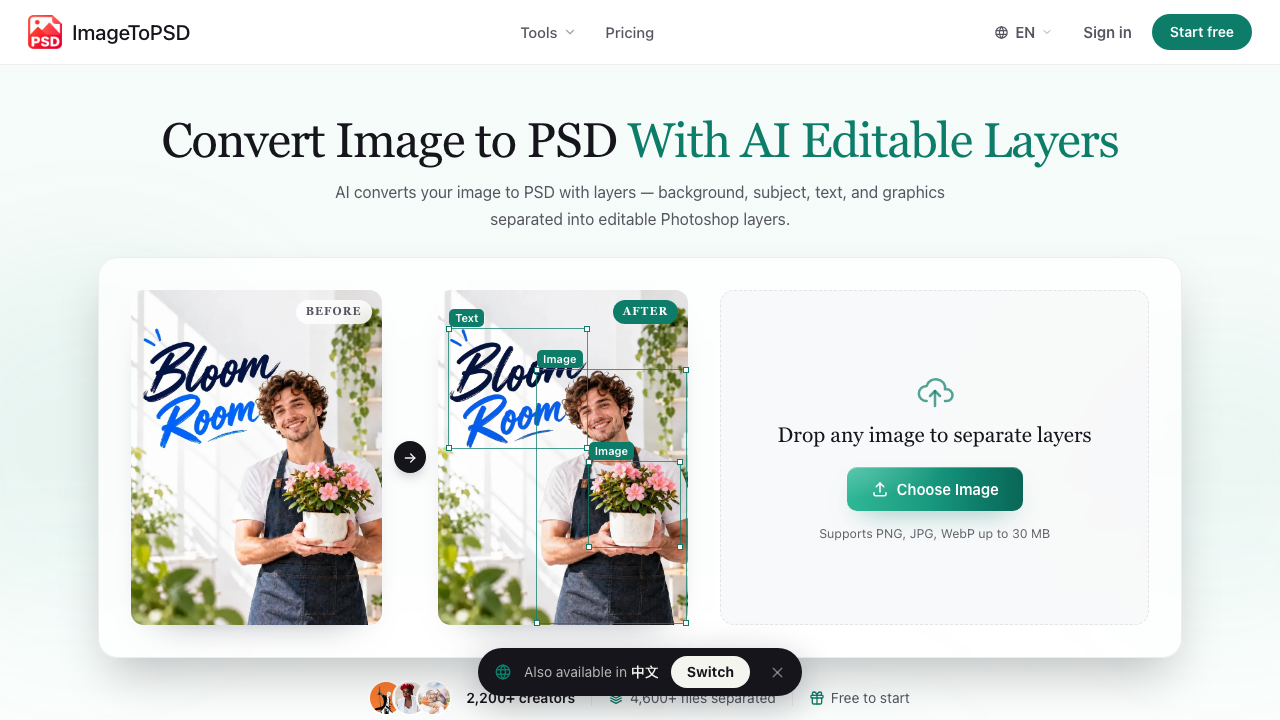
ImageToPSD turns a flat image into a layered Photoshop file. Upload a JPG, PNG, or WebP and the AI splits it into separate, editable layers for the background, subject, text, and graphics — then fills in the background behind anything it lifts out, so you can move or hide elements without leaving holes.
It is built for the moment you have a finished-looking image (an AI generation, a client screenshot, a product shot, a poster) and need to edit one part of it without rebuilding the whole thing from scratch.
Key Features
Content-aware layer separation — Automatically isolates subjects, text, badges, logos, and backgrounds into a clean layer hierarchy.
Custom region selection — Box any subject, prop, or detail to extract it as its own layer, up to 50 layers per image.
Background inpainting and occlusion fill — Reconstructs textures and shadows behind removed elements.
In-browser layer editor — Preview, reorder, and adjust layers before exporting.
Native PSD export — Download a layered PSD or a lossless PNG stack that works in Photoshop, Photopea, Affinity Photo, Figma, and Canva.
How It Works
Upload a JPG, PNG, WebP, screenshot, or AI-generated image (up to 30 MB).
The AI separates subjects, backgrounds, text, logos, and product areas into individual layers.
Download the layered PSD and keep editing in your design tool.
Use Cases
Making Midjourney, DALL·E, and Stable Diffusion outputs editable
Swapping text or logos on posters, banners, and social graphics
Repositioning products or people without manual masking
Recovering an editable file from a screenshot or flattened export
Pricing
New accounts get 20 free credits with no credit card, and uploaded files are auto-deleted after one hour. Paid packs are one-time payments: Starter $4.9 (200 credits, up to 16 layers), Pro $19.9 (1,000 credits, up to 30 layers), and Studio $49.9 (3,000 credits, up to 50 layers, batch upload, and a priority GPU queue).
Frequently asked questions
Can ImageToPSD convert an image to a PSD with real layers?
Yes. The AI separates the background, subjects, text regions, logos, and graphics into individual PSD layers, and rebuilds the background where elements were lifted out.
Which image formats are supported?
PNG, JPG, and WebP up to 30 MB, including screenshots and AI-generated images.
Do I need Photoshop to open the file?
No. The exported PSD opens in Photoshop, Photopea, Affinity Photo, and other PSD-compatible tools. Layers can also be exported as a lossless PNG stack.
Will Midjourney, DALL·E, or Stable Diffusion images work?
Yes. AI-generated images are a core input — the tool is built to make flat generations editable layer by layer.
Is ImageToPSD free?
You get 20 free credits at signup with no credit card. Paid packs are one-time purchases (from $4.9 for 200 credits) that never auto-renew and stay valid for 365 days.
Traffic & authority
Updated
Monthly visits
8K
+75% vs prior month
Domain Rating
12
Checked Nov 10, 2026
Global rank
#2,401,767
Rank in United States
#1,915,985
Bounce rate
38%
Oct 2026
Pages per visit
1.71
Oct 2026
Time on site
56s
Oct 2026
Site title
Privacy Policy | ImageToPSD
Domain registered
Apr 26, 2026
Domain expires
Apr 26, 2027
Site description: “Read ImageToPSD's privacy policy to understand what data we collect, why we collect it, and how your personal information is protected and handled.”
Monthly visits
· updated Nov 10, 2026
Domain Rating changes
· by check date
Traffic sources
· Oct 2026
Direct40.3%
Search31.9%
Referrals10.5%
Social5.6%
Display ads3.1%
Email3.0%
Affiliate1.9%
Paid search1.5%
AI assistants1.4%
Paid social0.7%
Source mix by month
Direct 40% Search 33% Social 6% Referrals 11% Paid 3% Email 3% Other 4%
Top countries
United States29.0%
India28.2%
Philippines11.1%
Egypt8.5%
United Kingdom7.1%
Top search keywords
Keyword
Searches/mo
CPC
Est. value
turn jpeg to layered psd free
370
—
$350
image to psd layers converter ai
130
—
$330
convert image to psd with layers
170
—
$320
imagetopsd
190
—
$290
gerar imagem em psd dividida em camadas a partir de um jpg gratis